Chapter 3 · 3.1
A tour of the Euro-Office screen
The Euro-Office screen is set up the way you know from Word and Excel. Let's walk through the parts.

- Tabs. File, Home, Insert, Draw, Layout, References, Collaboration, Protection and View. Each tab has its own buttons.
- Toolbar. The buttons of the selected tab. On Home, for example, you'll find font, bold, italic, alignment, lists and styles.
- The document. This is where you type and edit.
- Left sidebar. Search, comments, chat, headings (navigation through your document) and information.
- Right sidebar. Settings for what you've selected, such as a paragraph, table, image or chart.
- Status bar. The page number, word count, language, spell check and zoom.
- Editing. Choose how you work with the document: Editing, Reviewing (suggest changes) or Viewing (view only). See also A document opens as read only.
- Share. Share the file with colleagues.
- Close. Return to your files.
The tabs
On Insert, you add tables, images, shapes, charts, headers and footers, and page numbers.
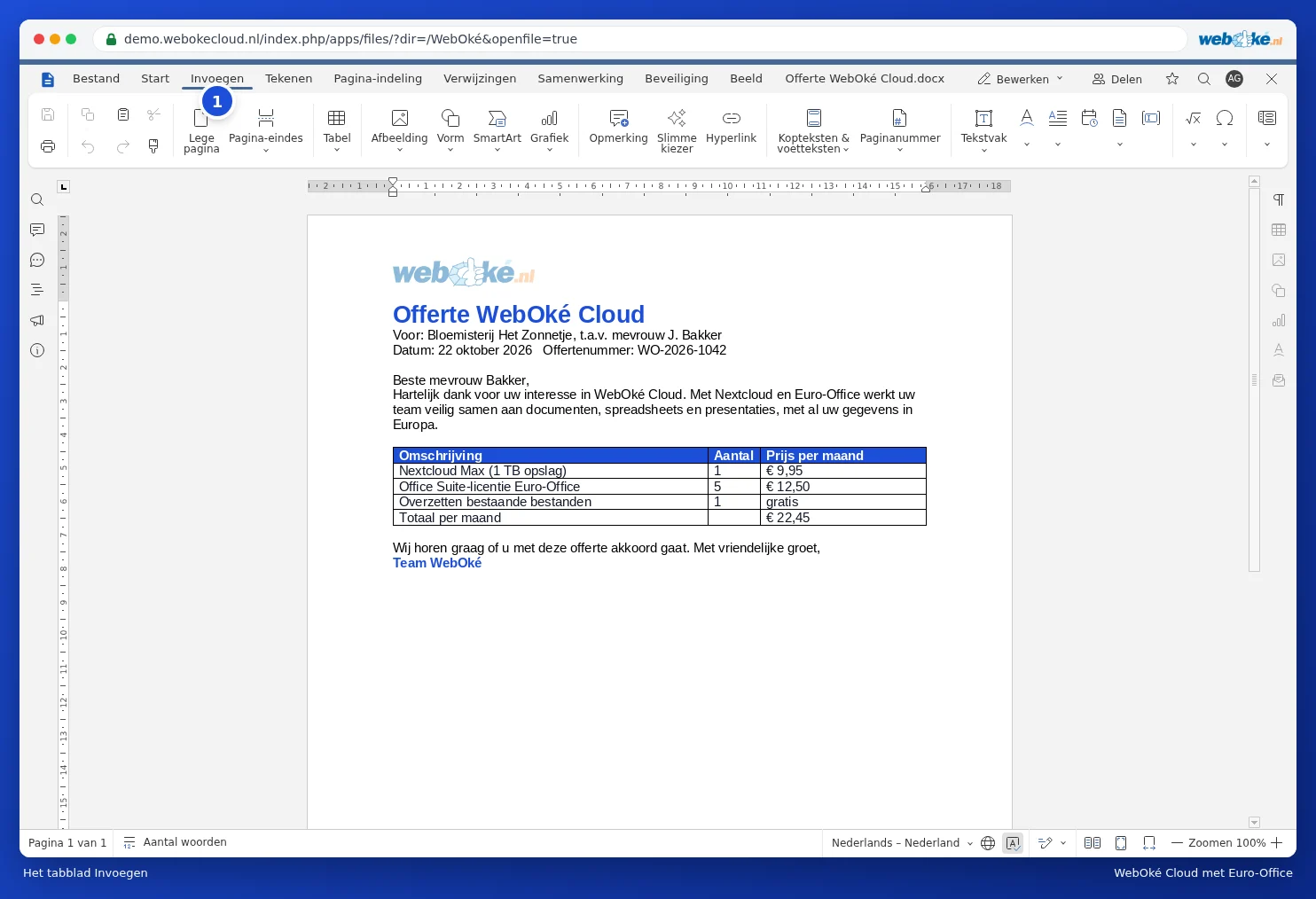
On Layout, you set margins, page orientation, columns and page breaks.
On Collaboration, you'll find comments, track changes, compare documents and version history.

The spreadsheet and presentation editors have the same structure, with tabs suited to that type of file, such as Formula and Data in a spreadsheet.