
Chapter 15 · 15.2
Taking over formulas from Excel: English function names and the comma
If you're used to working with Excel in English, you type =SUM, =IF and =VLOOKUP. Online tutorials usually already use this notation, but a colleague with a different regional setting, such as Dutch, might send you a formula with semicolons and names like =ALS. Which form does Euro-Office use?
How it works in your WebOké Cloud
In your WebOké Nextcloud, Euro-Office uses English function names and the comma between the parts of a function by default, just as in the English version of Excel. So you type =SUM(B3:B11), =IF(B5>0,"profit","loss") and =VLOOKUP(A3,Invoices!B2:H13,6,FALSE). A period is the decimal separator: 1.21.
Checking or changing the setting
- Click File and choose Advanced settings.
- Under Regional settings, look at Formula language (1). Here you choose the language you type your functions in.
- Under Region (2), you choose how dates, numbers and currency are displayed. Choose English (Ireland) for 23/10/2026, a period as the decimal separator and the euro symbol.
- Leave Use separators based on regional settings ticked, and click Apply.
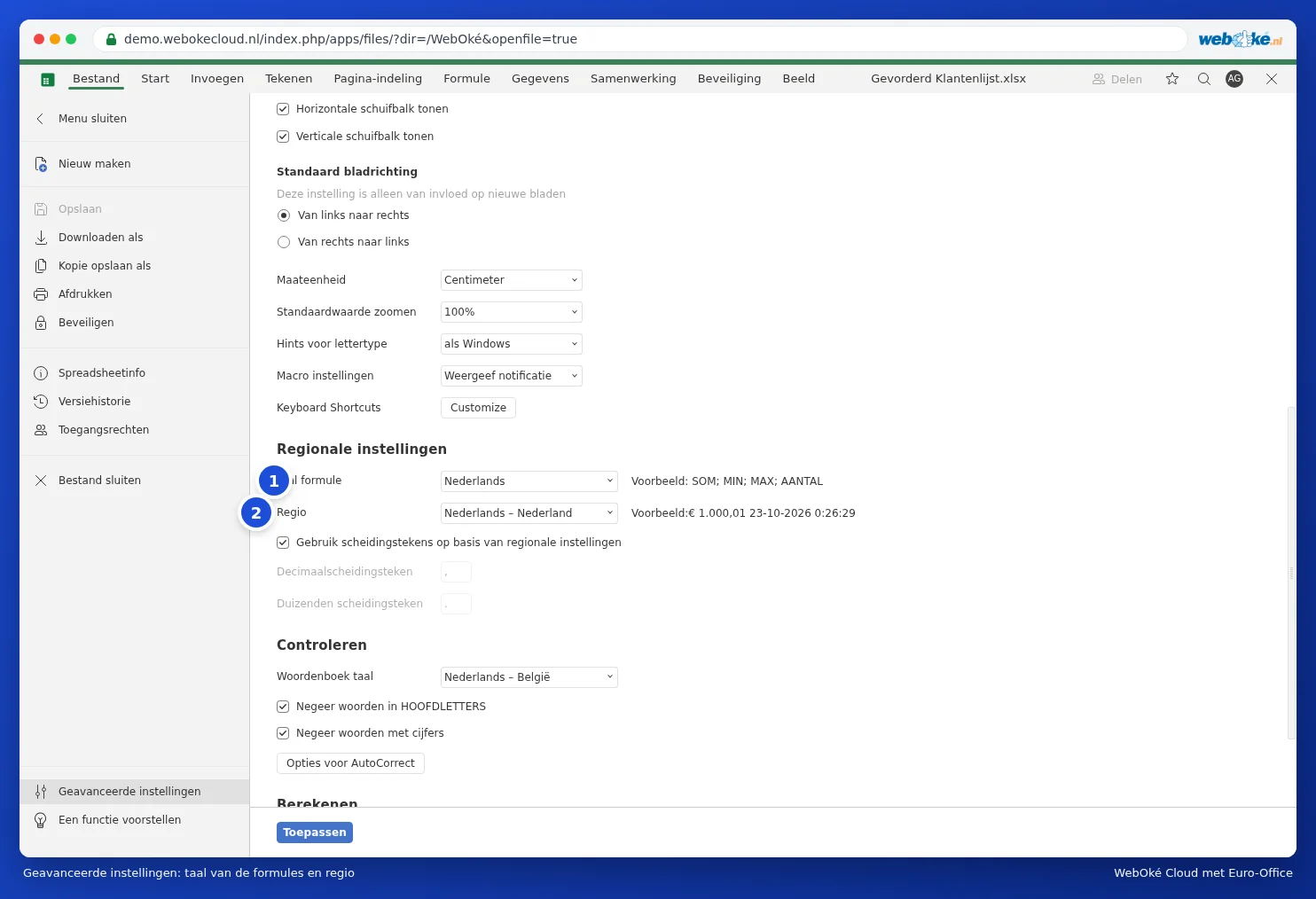
This doesn't change the file itself. A colleague who has Dutch set will simply see =SOM in the same file, and a Dutch version of Excel opens it without any problems.
Converting a Dutch formula
Translate the function names and replace the semicolons between the parts with commas. The most commonly used:
| Dutch | English |
|---|---|
| SOM, GEMIDDELDE, AANTAL | SUM, AVERAGE, COUNT |
| ALS, EN, OF | IF, AND, OR |
| VERT.ZOEKEN, X.ZOEKEN, VERGELIJKEN | VLOOKUP, XLOOKUP, MATCH |
| ALS.FOUT, ALS.NB | IFERROR, IFNA |
| SOM.ALS, SOMMEN.ALS, AANTAL.ALS | SUMIF, SUMIFS, COUNTIF |
| SPATIES.WISSEN, WISSEN.CONTROL, SUBSTITUEREN | TRIM, CLEAN, SUBSTITUTE |
| LINKS, RECHTS, DEEL, LENGTE | LEFT, RIGHT, MID, LEN |
| DATUM, VANDAAG, NETTO.WERKDAGEN | DATE, TODAY, NETWORKDAYS |
| TEKST.COMBINEREN, UNIEK, FILTER | TEXTJOIN, UNIQUE, FILTER |
Tip: not sure about a name? Go to the Formula tab and browse through the categories, or type the equals sign and the first few letters: Euro-Office will then show a list of matching functions.
Pitfalls
- #NAME? in the cell: the function name isn't recognised. (Euro-Office always shows error values using English codes, even if you're working with a different function language.) It's usually a Dutch name or a typo.
- In files that come from Excel in Dutch, you might sometimes see WAAR or ONWAAR instead of TRUE or FALSE. That works fine, you don't need to change it.
- If a formula uses a custom VBA function from Excel, it won't work. See An Excel file with VBA macros: what now?.